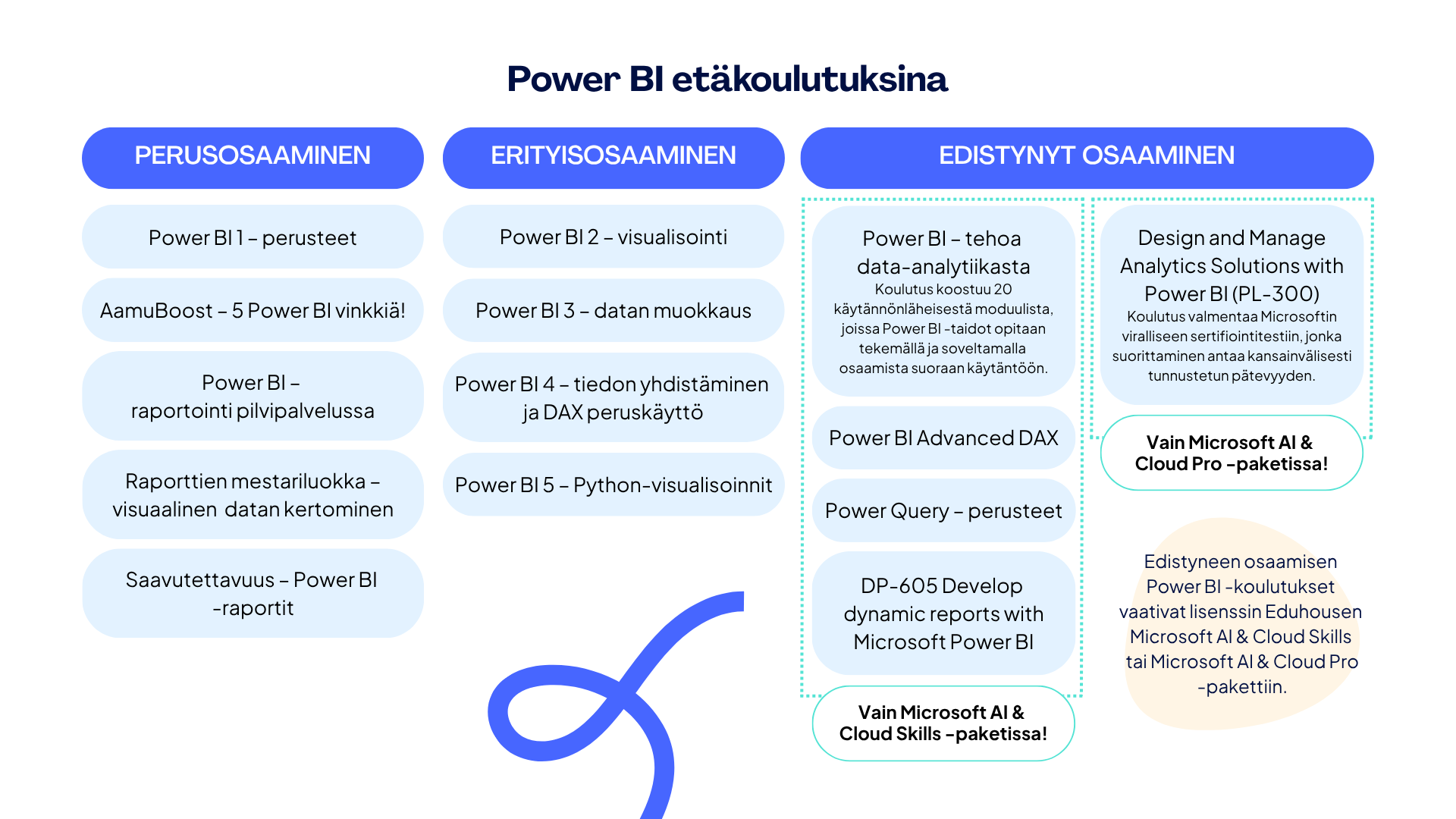
Microsoft Power BI Data Analyst -koulutus tarjoaa laajan tietopaketin Microsoftin Power BI -tuotteista. Koulutuksen aiheet kattavat kaiken olennaisen aina tiedon noutamisesta tietolähteestä valmiin raportin tietoturvalliseen jakamiseen asti. Koulutus koostuu moduuleista, joiden järjestys noudattaa todellisen Power BI -raportointiprosessin vaiheita. Teoria- ja demo-osuuksien lisäksi koulutuksessa tehdään laadukkaita ja hyvin ohjeistettuja harjoitustehtäviä, jotka antavat hyvän kuvan siitä mitä Power BI -raportointi käytännössä on ja mitä se vaatii.
Tavoite
Opi erilaiset menetelmät ja parhaat käytännöt tiedon mallintamiseen, visualisoimiseen ja analysoimiseen Power BI:n avulla.
Kenelle
Tämä koulutus soveltuu erinomaisesti kaikille Power BI -raportoinnista kiinnostuneille eikä vaadi aiempaa osaamista. Lisäksi kannustamme tutustumaan Power BI-koulutuksien opintopolkuun, joka auttaa sinua hahmottamaan, mitä muita taitoja voit kehittää!
Lisätiedot
Koulutus valmentaa Microsoftin viralliseen sertifiointitestiin PL-300 Microsoft Power BI Data Analyst, jonka suorittamalla saa Microsoft Certified: Power BI Data Analyst Associate -sertifioinnin.
Koulutuksen sisältö
Get data from data sources
- Identify and connect to a data source
- Change data source settings, including credentials, privacy levels, and data source locations
- Select a shared semantic model, or create a local data model
- Choose between DirectQuery, Import, and Dual mode
- Change the value in a parameter
Clean the data
- Evaluate data, including data statistics and column properties
- Resolve inconsistencies, unexpected or null values, and data quality issues
- Resolve data import errors
- Select appropriate column data types
- Create and transform columns
- Transform a query
- Design a star schema that contains facts and dimensions
- Identify when to use reference or duplicate queries and the resulting impact
- Merge and append queries
- Identify and create appropriate keys for relationships
- Configure data loading for queries
Design and implement a data model
- Configure table and column properties
- Implement role-playing dimensions
- Define a relationship’s cardinality and cross-filter direction
- Create a common date table
- Implement row-level security roles
Create model calculations by using DAX
- Create single aggregation measures
- Use CALCULATE to manipulate filters
- Implement time intelligence measures
- Identify implicit measures and replace with explicit measures
- Use basic statistical functions
- Create semi-additive measures
- Create a measure by using quick measures
- Create calculated tables
- Improve performance by identifying and removing unnecessary rows and columns
- Identify poorly performing measures, relationships, and visuals by using Performance Analyzer
- Improve performance by choosing optimal data types
- Improve performance by summarizing data
Create reports
- Identify and implement appropriate visualizations
- Format and configure visualizations
- Use a custom visual
- Apply and customize a theme
- Configure conditional formatting
- Apply slicing and filtering
- Configure the report page
- Use the Analyze in Excel feature
- Choose when to use a paginated report
Enhance reports for usability and storytelling
- Configure bookmarks
- Create custom tooltips
- Edit and configure interactions between visuals
- Configure navigation for a report
- Apply sorting
- Configure sync slicers
- Group and layer visuals by using the Selection pane
- Drill down into data using interactive visuals
- Configure export of report content, and perform an export
- Design reports for mobile devices
- Enable personalized visuals in a report
- Design and configure Power BI reports for accessibility
Identify patterns and trends
- Use the Analyze feature in Power BI
- Use grouping, binning, and clustering
- Incorporate the Q&A feature in a report
- Use AI visuals
- Use reference lines, error bars, and forecasting
- Detect outliers and anomalies
- Create and share scorecards and metrics
Create and manage workspaces and items
- Create and configure a workspace
- Assign workspace roles
- Configure and update a workspace app
- Publish, import, or update items in a workspace
- Create dashboards
- Choose a distribution method
- Apply sensitivity labels to workspace content
- Configure subscriptions and data alerts
- Promote or certify Power BI content
- Manage global options for files
Manage semantic models
- Identify when a gateway is required
- Configure a semantic model scheduled refresh
- Configure row-level security group membership
- Provide access to semantic models
- Configure automatic page refresh
Avainsanat
Data-analytiikka, Power BI, Power Query, Raportointi, Tiedon mallinnus